
1. The problem
Most people aren’t looking for “better email organization.” They’re trying to stop three concrete failures:
1) False positives: an important email gets buried, auto-archived, or marked spam.
2) Time waste: triage becomes a daily tax—deleting, scanning, second-guessing.
3) Security anxiety: every unknown sender could be a phishing attempt, but you still can’t ignore the inbox.
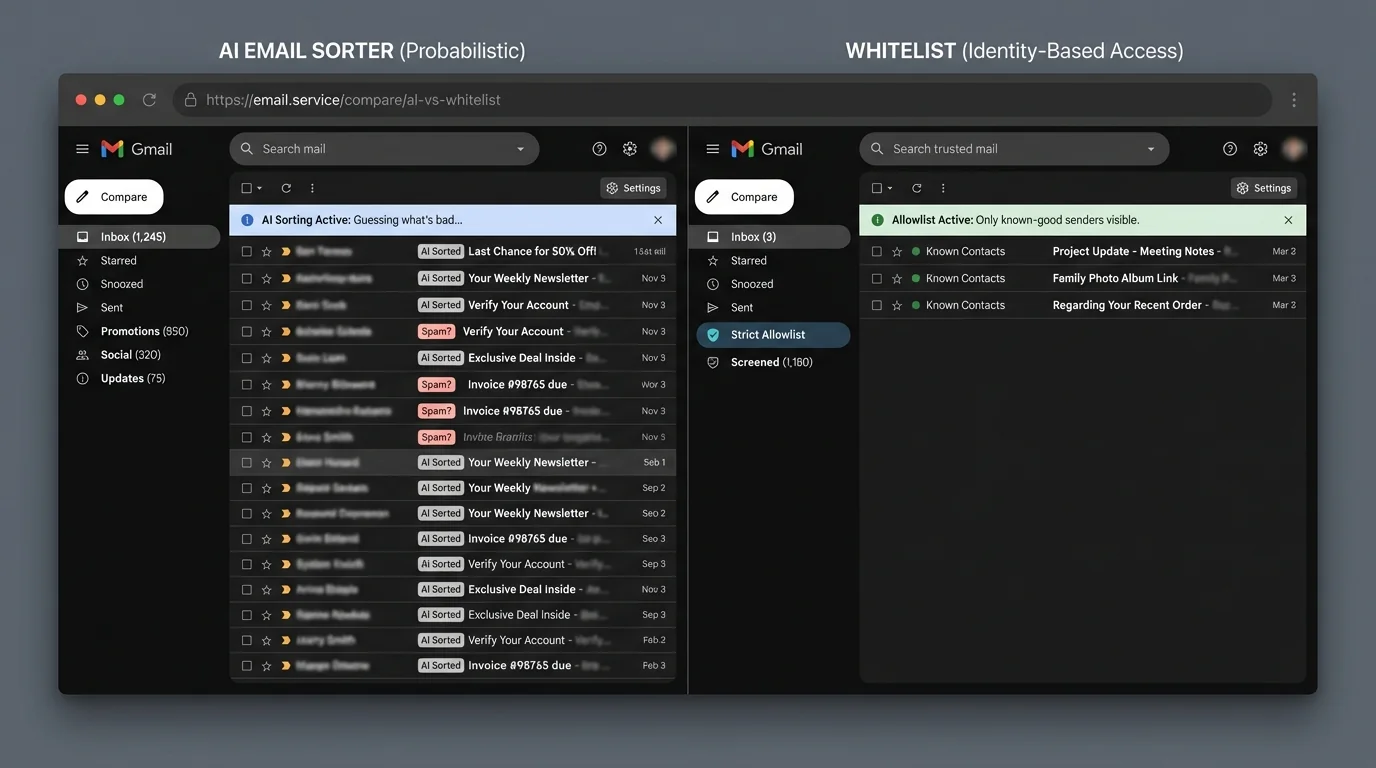
The core issue is architectural: an “open inbox” forces you to process untrusted input by default. Whether the system uses rules or AI, if strangers can reach your primary attention stream, you’re stuck doing interpretation and risk management all day.
That’s why methodology matters more than features. Some approaches try to guess what’s bad (AI sorting, spam filtering, blacklists). Another approach inverts the model: only allow known-good senders into your attention stream (strict allowlisting / contact-first filtering). In engineering terms, that’s moving from probabilistic classification to identity-based access control.
2. Methodology breakdown
Below are the dominant methodologies people actually deploy. Even when products blend them, each has distinct failure modes.
Manual rules (deterministic filtering)
How it works: You define explicit conditions (sender/domain/keywords) and actions (label, move, archive). Deterministic: if the condition matches, it triggers. Common in Gmail/Outlook filters and regex-like routing rules. Sources describe this as reliable until the underlying conditions change. (emailsorters.com, parseur.com)
Where it shines:
- Predictability and auditability: you can explain every routing decision.
- Low compute, low privacy risk: mostly local or provider-side primitives.
- Great for stable streams (e.g., automated receipts, ticketing notifications).
- Low false positives when rules are correct (deterministic match).
Where it fails:
- Brittleness: small changes break the rule (new domain, different “From”, new template). One source explicitly notes rules break when formats shift. (futurecoworker.ai)
- Maintenance drag: rule count grows with workflow complexity; governance becomes the real cost. (lifetips.alibaba.com)
“Rule broke when sender changed domain.” (futurecoworker.ai)
Engineering verdict: Manual rules are tight-coupled integrations with email metadata. They scale poorly because every new sender pattern adds a new branch to maintain. In systems terms: complexity grows roughly linearly with the number of exceptions, and exceptions compound.
Rules don’t fail gracefully: when they drift out of sync with reality, you typically discover it after a missed email.
AI email sorting (probabilistic classification)
How it works: Machine learning models classify messages into buckets (primary/other, important/unimportant, spam/not spam) using features like content, sender reputation, and user behavior. These models adapt as you interact with email. This is described as dynamic learning using ML and NLP methods. (emailsorters.com)
Where it shines:
- Handles variability: new senders and new phrasing don’t require new rules.
- Better against novel spam/phishing: models can generalize beyond known signatures; sources cite high detection accuracy (95–99.9%). (aiforbusinesses.com)
- Lower “setup burden”: you can get a useful result with minimal configuration.
Where it fails:
- False positives you can’t tolerate: if the model hides/archives a legitimate message, you pay the cost in missed deadlines and lost revenue.
- Black-box decisions: it’s often hard to explain why an email got deprioritized.
- Model drift: changing projects, roles, or communication patterns can degrade performance without obvious signals.
Real complaints are consistent: “important stuff goes to spam/other.”
“Paid invoice or deadline emails wrongly categorized as spam.” (reddit.com)
“New account verifications and newsletters—even from big names—end up in spam, requiring whitelisting.” (reddit.com)
“Auto-archived important client emails… leading to lost revenue.” (linkedin.com)
Engineering verdict: AI sorting is a best-effort classifier. That’s fine for recommendations (what to read first), but risky for gating attention. The key problem is mismatch between model goals and user risk tolerance:
- If you receive 50 legitimate emails/day (~18,250/year) and the AI has even a 1% false positive rate, that’s ~182 legitimate emails misrouted per year.
- If those include invoices, legal notices, customer escalations, or access codes, “only 1%” is operationally unacceptable.
Some sources cite much higher misclassification on urgent messages (22–37%). Even if those numbers vary by environment, the takeaway is: classification error is guaranteed, and the most damaging errors are the ones you notice late. (lifetips.alibaba.com)
AI sorting is not “wrong sometimes.” It is mathematically required to be wrong sometimes—and you don’t get to choose which emails.
Blacklisting (block known-bad)
How it works: Known malicious senders/domains/IPs are blocked based on reputation lists and historical signals. This is commonly contrasted with allowlists. (aiforbusinesses.com)
Where it shines:
- Fast wins against repeat offenders.
- Simple mental model: “if bad, block.”
- Useful as a secondary control in layered security.
Where it fails:
- Reactive by design: you can’t blacklist what you haven’t seen.
- Evasion is cheap: attackers rotate domains and infrastructure.
Security sources and discussions highlight how attacker infrastructure changes quickly, leaving blocklists behind. (strongestlayer.com)
Engineering verdict: Blacklisting is an eventually-consistent security control in a real-time threat environment. It’s necessary hygiene, but it can’t be your primary inbox strategy because it optimizes for yesterday’s threats.
Strict allowlisting (contact-first filtering)
How it works: Only messages from known/trusted identities (usually contacts) are allowed into your primary inbox. Everything else is diverted to an “outsiders” area for review. This aligns with the allowlist concept described in comparisons of spam filtering approaches. (aiforbusinesses.com)
Where it shines:
- Near-zero attention leakage: unknown senders don’t get to interrupt you.
- Deterministic behavior: if you’re not on the allowlist, you don’t land in the main flow.
- Low triage time: you only process known-good by default; outsiders are batch-processed.
- Clear security posture: reduces exposure to cold phishing attempts reaching your primary attention stream.
Where it fails:
- Onboarding friction: legitimate first-time senders can be diverted.
- Edge-case sender variation: a vendor might email from an alternate domain.
“Whitelists miss legitimate emails from alternate sender variations.” (reddit.com)
- Security caveat if implemented naively: administrators often resist indiscriminate whitelisting because compromised accounts can bypass checks.
“Whitelisting… bypasses safeguards… if the sender is compromised.” (reddit.com)
Engineering verdict: Strict allowlisting is identity-based gating. That’s a fundamentally stronger primitive than probabilistic classification for controlling attention and reducing noise. The main engineering work is designing:
- a safe “outsiders” review queue,
- fast promotion of legitimate senders,
- and guardrails so allowlisting doesn’t bypass authentication or malware scanning.
Allowlisting works best when it routes outsiders away from your inbox rather than permanently deleting them.
3. Comparison table
The table below compares methods on the dimensions that matter operationally: how often they misroute good mail, how much time you spend daily, how much ongoing upkeep is required, and what security posture they create.
| Methodology | False Positives (legit mail mishandled) | Time Cost (daily triage) | Maintenance | Security |
|---|---|---|---|---|
| Manual rules | Low when correct, high when rules drift | Often low once tuned; can regress suddenly | Medium–High (rule sprawl, audits) | Limited phishing detection; strong determinism |
| AI sorting | Non-zero by design; urgent-mail misses reported | Moderate reduction (some sources cite 18–32%) | Medium (tuning + drift correction) | Stronger vs novel phishing; black-box risk |
| Blacklisting | Low for known threats; weak against new | Little improvement to legitimate triage | High (lists churn) | Reactive; behind adaptive attackers |
| Strict allowlisting | Very low inbox false positives; outsiders routed | Large reduction if inbox is “known senders only” | Medium early, low later | Strong reduction of cold attacks reaching inbox; must avoid bypassing auth checks |
4. The winner: strict allowlisting
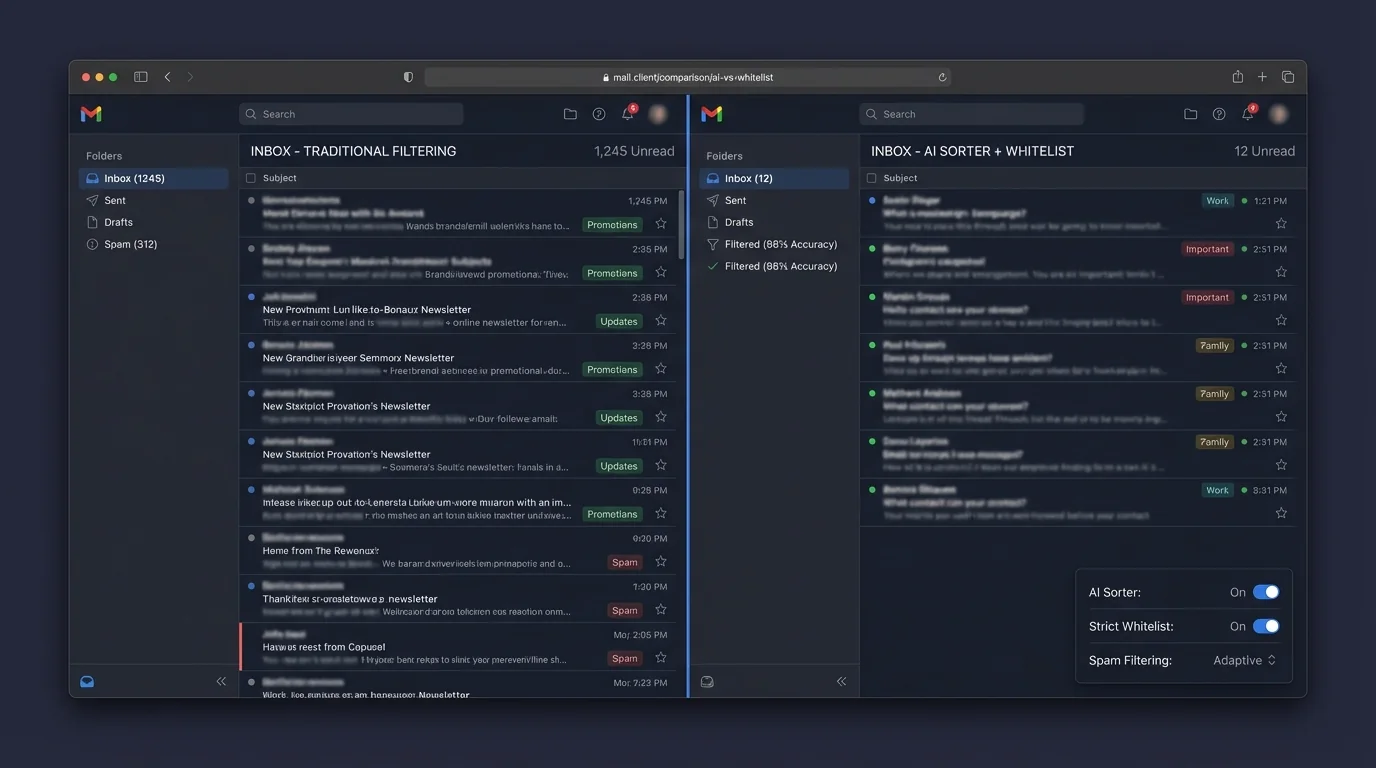
From an engineering standpoint, strict allowlisting wins because it changes the system’s default:
- AI sorting asks: “Is this message probably important?”
- Allowlisting asks: “Is this sender allowed to consume attention?”
That inversion matters because email is an adversarial channel. Senders can:
- mimic legitimate language,
- spoof display names,
- and optimize for clicks.
Why “guessing” fails as a control plane
AI classifiers are excellent at ranking and clustering, but inbox control is not a ranking problem—it’s an access control problem.
If your primary inbox is a scarce resource (attention), then your system needs:
- a stable definition of who can write into it,
- an auditable policy,
- and predictable failure behavior.
Allowlisting provides exactly that. Errors are also safer:
- With AI sorting, the worst error is hiding an important email.
- With allowlisting, the common error is diverting a first-time sender to an outsiders queue—recoverable in a controlled review step.
Operational math: error cost, not just error rate
A small false-positive rate can still be unacceptable when the cost of a miss is high.
Example: if you get 100 legitimate messages/day (~36,500/year), a 1% misrouting rate is 365 messages/year that you may not see in time.
Even if AI has great overall accuracy, the organization cares about the tail risk: the one misrouted escalation, the one missed invoice, the one login code.
Implementation pattern: “Inbox = known-good, Outsiders = batch review”
The strict allowlisting architecture that scales is:
1) Known senders → primary inbox (fast path)
2) Unknown senders → outsiders folder/label (slow path)
3) Promotion → one action to add sender to allowlist
4) Security remains layered → SPF/DKIM/DMARC checks, malware scanning, and provider-level protections still apply
This is the core of the KeepKnown Protocol: an API-level, server-side filter that routes non-contacts into a dedicated KK:OUTSIDERS label/folder so your inbox becomes a trusted channel. KeepKnown supports Google Workspace/Gmail and Microsoft platforms (Outlook/Microsoft 365), uses OAuth2 verification (including CASA Tier 2), and stores encrypted hashes rather than plaintext.
More importantly, it’s architected as screening over sorting—you stop trying to rearrange the flood and instead reduce what reaches the main stream in the first place.
If you want the broader landscape of approaches and why this inversion tends to win, see: Best Email Filtering Methods Compared (and Why Strict Allow‑listing Wins). For the human cost driving the search for these systems, see: Email Overload Statistics 2024: The Inbox Became a Hidden Tax on Business and Mental Health and Email Anxiety Symptoms: Why “Managing Your Inbox” Is Making You Worse.
Architecturally, strict allowlisting is closer to “zero trust” for inbound email: trust is explicit, not inferred.
5. When other methods still make sense
Strict allowlisting is not the answer to every inbox.
AI sorting makes sense when
- You must accept high volumes of first-time senders (e.g., public-facing roles).
- You can tolerate occasional misclassification because nothing is truly hidden (sorting only, no auto-archive).
- You need advanced phishing detection that leverages content and behavioral signals.
Trade-off: you’re accepting a probabilistic system where you must periodically audit “Other/Spam” to catch misses.
Manual rules make sense when
- Your inbound traffic is stable and templated (alerts, receipts, monitoring).
- You can formalize routing as deterministic policies with clear owners.
Trade-off: rules become a small software project. Without ownership and audits, they rot.
Blacklisting makes sense when
- You treat it as baseline hygiene—not as your main productivity or security layer.
Trade-off: it won’t stop new campaigns quickly enough to protect attention by itself.
Strict allowlisting is hardest when
- You rely on inbound from unknown people (job applications, sales inquiries, press).
A common pattern is to keep a public channel open (forms, ticket portals, alias inboxes) while keeping personal/executive inboxes strict. That’s not ideology—it’s traffic engineering.
6. Verdict
If your goal is reclaiming attention and reducing missed-important-email risk, strict allowlisting is the superior methodology because it replaces probabilistic guessing with deterministic access control.
AI sorting is powerful for ranking and threat detection, but it is structurally misaligned with the user’s core need: “never miss a legitimate message I care about.” Even a low false-positive rate produces unacceptable tail-risk at scale.
The most robust architecture is:
- Strict allowlisting for attention control (known-good into inbox, outsiders queued),
- plus standard provider security controls for malware/phishing,
- and optional lightweight rules for predictable machine-generated mail.
That “invert the inbox” model is exactly what KeepKnown implements at the API level (server-side), moving non-contacts into KK:OUTSIDERS so your inbox becomes a high-trust queue. Learn more at https://keepknown.com.