
1. The problem
People search “spam filter vs allowlist” for one reason: the open inbox has become a hostile interface.
You’re juggling three failure costs at once:
- False positives: a real email gets buried or blocked (job offer, invoice, login alert).
- Time waste: you scan, delete, unsubscribe, and second‑guess daily.
- Security anxiety: every unfamiliar sender could be a phishing attempt.
Even when the “spam filter strength” is lowered, users and moderators report systems that still catch legitimate content with no clear recovery path:
“Spam filter beyond broken” — users describing legitimate posts/emails repeatedly flagged with months of manual intervention to recover. (Forum reports)
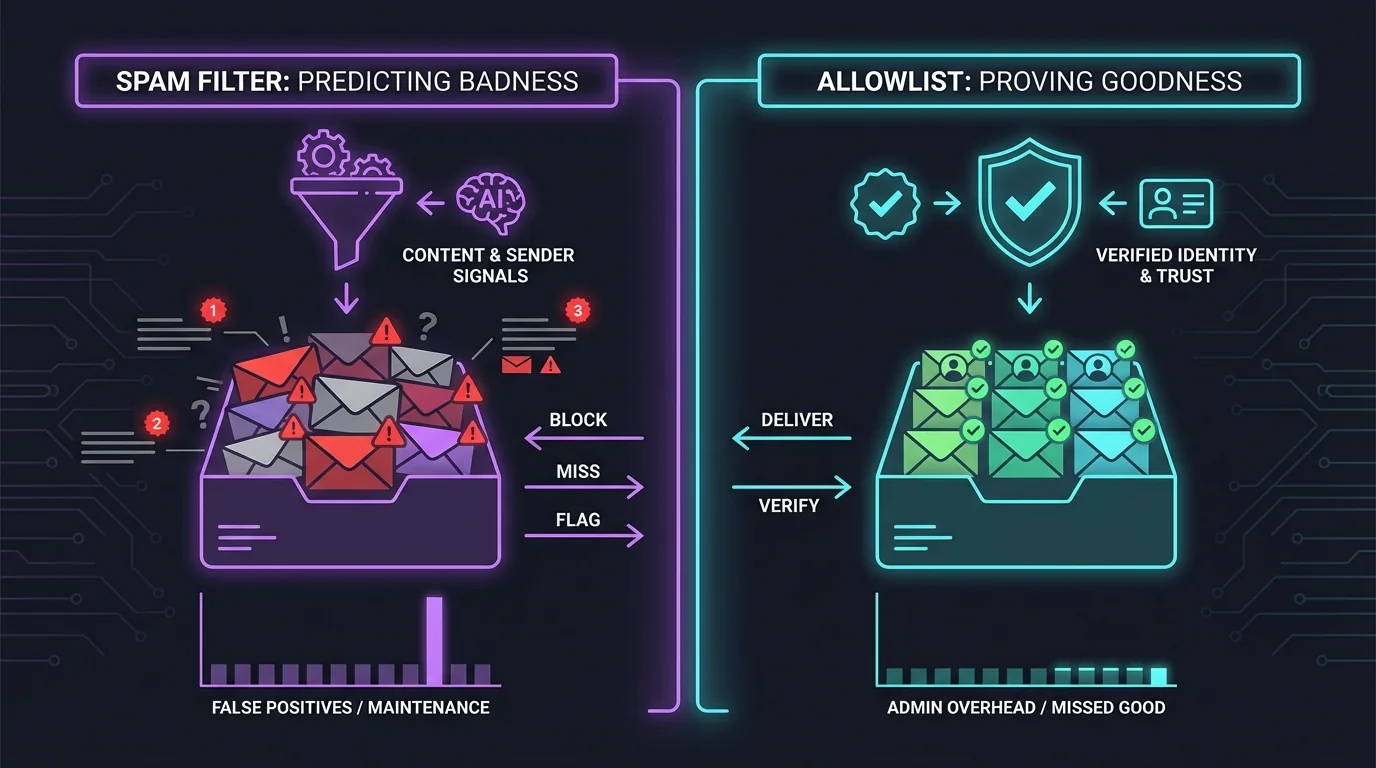
At an engineering level, this isn’t a UI problem. It’s a classification model problem: most spam filtering tries to predict badness from content and sender signals, while allowlisting tries to prove goodness by identity.
2. Methodology breakdown
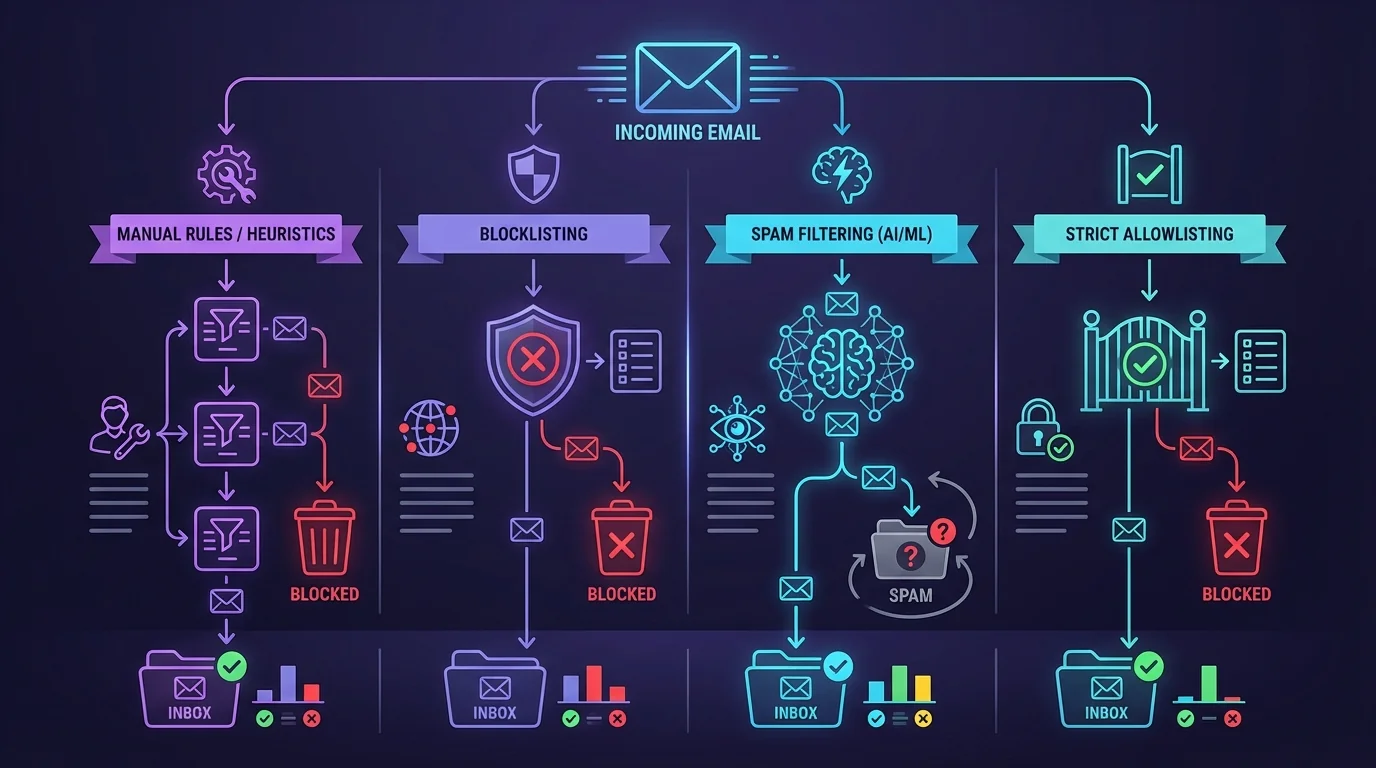
Below are the dominant methodologies, evaluated by how they behave under real-world adversaries, changing senders, and human time constraints.
AI and smart sorting
How it works: A model assigns a probability that a message is spam/low priority based on content, headers, sender reputation, and user interaction history.
Where it shines:
- Catches novel spam that doesn’t match known signatures.
- Reduces manual rule writing for typical users.
- Can detect some phishing patterns beyond simple keywords.
Where it fails:
- Opacity: users can’t reliably predict what gets filtered.
- False positives are expensive: one “important” email misplaced is a trust breaker.
- Adversarial adaptation: attackers mutate content to evade models.
Research shows modern AI-based detectors can be manipulated; LLM-based spam/phish classifiers are susceptible to adversarial inputs and poisoning risks, despite high baseline accuracy (see LLM adversarial analysis literature, e.g., arXiv:2504.09776).
And older statistical systems can fail hard against AI-generated variants—e.g., Bayesian-style filters misclassifying LLM-modified spam at high rates in reported studies (e.g., arXiv:2408.14293).
Real user sentiment (common across forums) is consistent:
“Had to check spam daily” / “Missed important email” — recurring complaint pattern about unpredictable misclassification.
Engineering verdict: AI sorting scales in throughput, but it does not scale in trust. When a system’s decision boundary is non-obvious and occasionally wrong, users build a compensating process (checking spam, scanning tabs), which reintroduces the time cost the system was meant to remove.
A 1% false-positive rate sounds small until you apply volume. If you receive 100 legitimate emails/week, that’s ~52 misplaced legitimate emails/year.
Manual rules and heuristic filtering
How it works: Deterministic rules (keywords, regex, header checks, scoring) route or block messages.
Where it shines:
- Explainable outcomes: you can audit “why” a message moved.
- Works well for stable, narrow patterns (e.g., internal notifications).
- Local processing can be privacy-friendly.
Where it fails:
- Brittleness: spam changes wording; legitimate senders change domains.
- Rule drift: a pile of exceptions accumulates.
- Human maintenance becomes the main cost center.
This failure mode is widely documented in anti-spam technique summaries: heuristic/regex systems require continual updates as attackers vary tokens and domains (see general anti-spam technique overviews).
Users and admins commonly describe the operational cost:
“Too many rules to manage” — maintaining lots of rules becomes its own job.
Engineering verdict: Rules scale poorly across time. Every additional rule increases complexity, conflicts, and debugging cost. In distributed environments, propagating and auditing rule sets across accounts/teams becomes a configuration management problem.
Rules are best used as guardrails (e.g., “always allow internal domain”) rather than as the primary spam strategy.
Blocklisting and reputation lists
How it works: Deny or down-rank senders/domains/IPs known to be abusive. A common pattern is DNS-based blocklists (DNSBL) that identify IPs associated with spam.
Where it shines:
- Fast to implement and cheap to run (lookup + decision).
- Effective against known, repeat-abuse infrastructure.
- Useful as a layer in a defense-in-depth pipeline.
Where it fails:
- Reactive by design: new senders aren’t listed yet.
- Staleness and collateral damage: legitimate senders can share infrastructure or move.
- Arms race: attackers rotate domains/IPs faster than lists update.
Blocklists are well described as “known bad” mechanisms (e.g., DNSBL summaries). Operationally, they also go stale as threat sources change rapidly, requiring continuous updating and governance (discussed in blocklisting best-practice writeups).
A real-world moderation example shows overblocking by outdated heuristics:
Mods report filtering that blocks broad domain classes (e.g., certain TLDs) even as they become legitimate.
Engineering verdict: Blocklisting scales in simplicity but fails in coverage under churn. The more dynamic the threat landscape, the more your miss rate becomes “everything not yet discovered.”
Strict allowlisting and contact-first filtering
How it works: Only pre-approved identities (contacts, known domains, explicit allow rules) are permitted into the inbox. Everything else is routed away for review.
Where it shines:
- Near-zero phishing exposure from unknown senders (they never hit the inbox).
- Predictable behavior: users know where unknown senders go.
- Eliminates the need to guess “badness.”
Where it fails:
- Onboarding friction: new legitimate senders start as outsiders.
- Requires a workflow for approving new senders.
- Not suitable for inboxes that must accept inbound from the public without friction.
Allowlisting is explicitly defined in security guidance as bypassing inspection for trusted senders and enforcing trusted identity sets (see allowlist/denylist conceptual docs, e.g., Juniper’s overview).
Engineering verdict: Allowlisting is architecturally clean because it turns classification into an identity check. However, it must be implemented with good ergonomics—otherwise the human “approve new sender” loop becomes the bottleneck.
Allowlisting fails socially, not technically, if you require the inbox owner to manually curate hundreds of legitimate first-time senders per month.
3. Comparison table
| Methodology | False Positives | Time Cost | Maintenance | Security |
|---|---|---|---|---|
| AI / Smart Sorting | Medium (trust-breaking when wrong) | Medium (users often compensate by checking spam/tabs) | High (model updates, monitoring, edge-case handling) | Medium–High (good coverage, but adversarial evasion exists) |
| Manual Rules / Heuristics | Medium | High (rule writing + debugging) | High (drift, conflicts, updates) | Medium (good for known patterns, weak to novel attacks) |
| Blocklisting | Medium (collateral blocking possible) | Medium | Medium–High (stale lists, governance) | Medium (good vs known bad, weak vs new infra) |
| Strict Allowlisting | Low for known senders; high for first-time outsiders | Low daily triage once tuned; some onboarding review | Medium (curate trusted set, but stable over time) | High (unknown senders don’t reach inbox) |
4. The winner: strict allowlisting
From an engineering fundamentals perspective, strict allowlisting wins because it changes the problem from probabilistic classification to deterministic access control.
Why the inversion matters
Spam filters (AI, rules, blocklists) share a core flaw: they’re trying to answer
- “Is this message bad?”
That’s an adversarial question. Attackers can:
- mutate wording,
- rotate domains and IPs,
- exploit model blind spots,
- imitate legitimate brands.
Allowlisting asks a different question:
- “Is this sender known-good?”
That’s closer to how secure systems are built:
- zero trust networking doesn’t “detect bad packets,” it authenticates and authorizes.
- application allowlisting doesn’t “detect malware,” it executes approved binaries.
Email is late to this pattern because historically we pretended inboxes were public endpoints. The open inbox is a failed concept at modern spam/phishing volumes.
The trade-off math
The deciding factor is the cost asymmetry of mistakes:
- A false negative in spam filtering can be a credential theft event.
- A false positive can be a missed payment, missed customer, missed legal notice.
Strict allowlisting intentionally accepts one cost: some first-time legitimate senders will be treated as outsiders. But it makes that cost visible and controllable (review outsiders), rather than hidden and random (important mail buried in spam).
What “good” looks like in practice
A practical strict allowlist system needs:
- Server-level enforcement (so the policy is consistent, not a fragile client-side plugin).
- A quarantine lane (so unknown messages aren’t deleted; they’re reviewable).
- Low data exposure (avoid sending full message content to third parties).
This is the architecture behind the KeepKnown protocol: an API-based email filter that moves non-contacts into a dedicated “KK:OUTSIDERS” label/folder instead of relying on algorithmic guessing. It’s designed to run at the account level across Gmail/Google Workspace and Outlook/Microsoft 365, using OAuth2 with CASA Tier 2 controls and encrypted hashes (no plaintext storage). More details at https://keepknown.com.
If your goal is “stop spending attention on strangers,” allowlisting is the only methodology that directly enforces it.
If you want to go deeper on the methodology angle, see: Best Email Filtering Methods Compared (and Why Strict Allow‑listing Wins).
And for the human cost this removes, see: The Cost of Email Distraction: Unseen Impacts and Solutions.
5. When other methods still make sense
Strict allowlisting is the best default for most personal and executive inboxes, but other approaches still have legitimate use cases.
Use AI/smart sorting when
- You must accept inbound mail from the public (sales inquiries, support, recruiting).
- You can tolerate some review overhead and occasional misses.
- You have the operational maturity to monitor false positives and continuously tune.
Architectural note: In these cases, treat AI as a triage assistant, not as an authority. Build an audit trail and easy recovery.
Use blocklisting when
- You operate a mail gateway and need a cheap first-pass reject layer.
- You have strong threat intel inputs and update pipelines.
Architectural note: Blocklists are best as a coarse “known bad” gate ahead of deeper checks.
Use manual rules when
- You have stable sender patterns (internal systems, notifications).
- You need explainability for compliance.
Architectural note: Keep rule scope narrow and version-controlled. Don’t let it become your primary spam strategy.
Use a hybrid (common in real systems)
A layered system can be sane, as long as each layer has a clear job:
- Allowlist for inbox admission
- Quarantine for outsiders
- Blocklist for obvious abuse
- Rules for deterministic routing
- AI for anomaly detection and prioritization
The key is governance: users complain most when systems are opaque and irreversible.
For related workflows that keep quarantine manageable, see: How to Create Gmail Labels Fast and Correctly and How to Archive Emails in Gmail Fast and Safely.
6. Verdict
If the question is “spam filter vs allowlist, which is better?” the engineering answer depends on what you’re optimizing.
- If you need an inbox that acts like a public contact form, spam filters (AI + reputation + rules) are unavoidable—but you must accept ongoing tuning and occasional critical mistakes.
- If you need an inbox that acts like a trusted communications channel, strict allowlisting is architecturally superior because it replaces probabilistic guessing with deterministic access control.
The modern “inbox” that matters—your attention and your security posture—benefits from inversion: don’t block the bad; only allow the good.